Conount-blogger tips,Marketing, Web Design, Computer Hardware and Network, Business and Finance.: Technology
Showing posts with label Technology. Show all posts

Is WhatsApp Safe?


                       WhatsApp


WhatsApp is a popular free social networking mobile app that allows users to create an account, send messages, photos and video, and keep in touch with friends, family and colleagues.


1) How to configure privacy settings on WhatsApp?
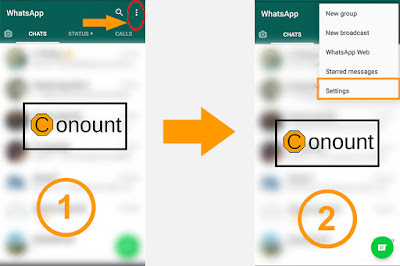


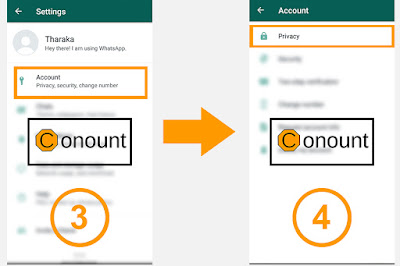
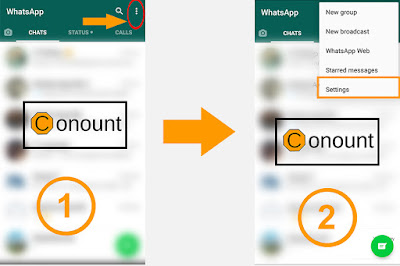
Once you go to WhatsApp, tap on the Menu button displayed at the top right corner and then select icon just after the search bar.

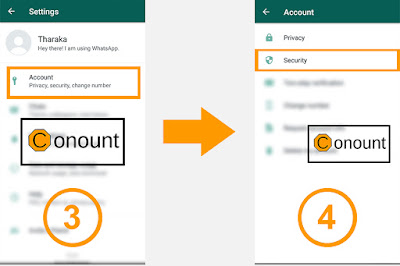
Go to Settings → Account→ Privacy

Then you can set the following options separately for last seen, profile photo about (personal information) and status

Everyone

Your last seen profile photo and/or status will be available to all WhatsApp users.

My Contacts

Your last seen profile photo and/or status will be available only to your contacts from your address book.

Nobody

Your last seen profile photo and/or status will not be available to anyone.


2) How to configure security settings on WhatsApp?


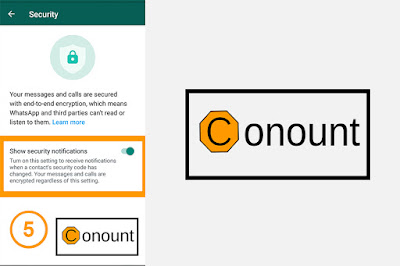
  • WhatsApp has performed a magnificent feat in bringing end-to-end encryption for all communications
  • Make sure that WhatsApp has access to your camera. You may have already allowed this when you install WhatsApp.
  • Open a conversation with your friend in WhatsApp and then select the person’s name at the top of the conversation.
  • This will open the contact window for that person. Near the bottom of that screen, you will see a setting for Encryption.
  • Tap on the encryption field, and you will view a screen that displays a QR code as well as a 60-digit decimal code that represents the contents of that QR code.
  • At the bottom of the QR code screen, there is a link that will enable you to scan your friend’s code, and they can do the same for your code. 


3) How to configure two-step verification settings on WhatsApp?
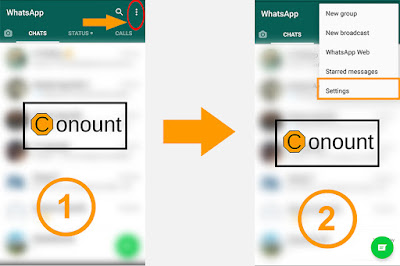


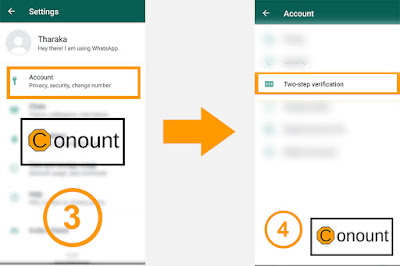
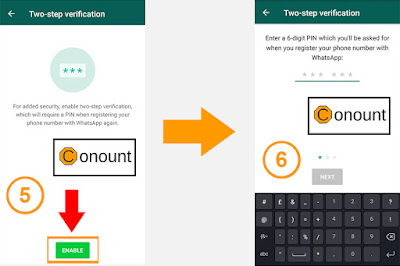
1.  Once you go to WhatsApp, tap on the Menu button displayed at the top right corner and then select the drop down icon just after the search bar.

2.  Then select, Settings  Account → Two-step verification → Enable

3.  Once you do that, the app will ask you to provide an email and set a six-digit passcode.

4.  On next screen, enter your email ID (optional) to enable pass code recovery via email. (It's recommended to use email as a backup so that you're not locked out of your account if you forget your passcode.) Then tap “Done”.

5.   Next time when you reconfigure your WhatsApp account on your new phone or want to add a new phone number to your account, the messaging app will require you to enter and confirm this six-digit secret code.

6.  Importantly, two-step verification can be disabled within the app without a passcode so your account could still be compromised if your phone falls into the wrong hands. But the update should help lock things down in case someone tries to hijack it from afar.


4) How to change the number on the WhatsApp account?


1.   Make sure your new “phone number “can receive SMS and/or calls and has an active data connection before changing the number.

2.  Make sure your “old phone number “is currently verified in WhatsApp on your phone. You can see what number is verified in WhatsApp by navigating to WhatsApp Settings and tapping on your profile photo before changing the number.

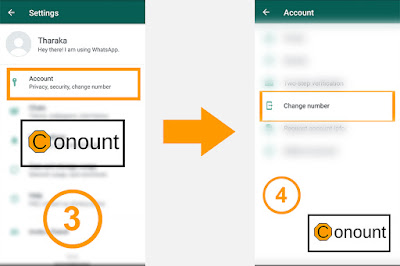
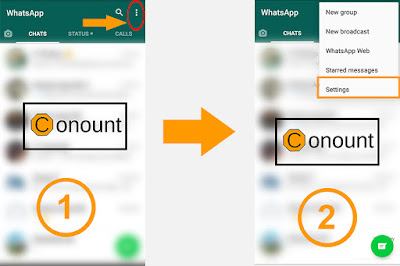
3.  Once you go to WhatsApp, tap on the Menu button displayed at the top right corner and then select dropdown icon just after the search bar.

4.  Then select, Settings Account Change Number.

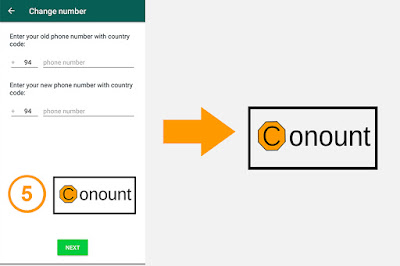
5.  Enter your current WhatsApp phone number in the first text box. Enter your new phone number in the second text box. Then tap “Done” to continue

6.   If you Change Number, as long as you continue using the same phone your chat history will be available on your phone with the new phone number.


How to delete the WhatsApp account?


1. Removal of all the information in your chats and media files in WhatsApp is however not a permanent process. It does not guarantee permanent deletion of all data in such a way that they are unrecoverable.

2.  Check all the information in the ‘WhatsApp' and ‘WhatsApp Attachment' before you start deleting your account. This will help in permanently erasing all the data, and. This will ensure that no privacy leak happens when you delete the account.

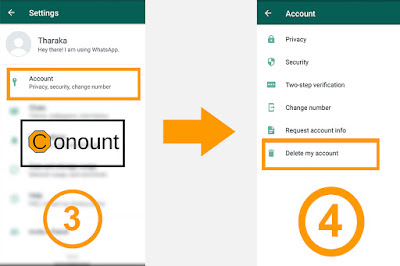
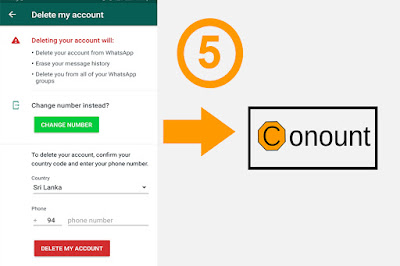
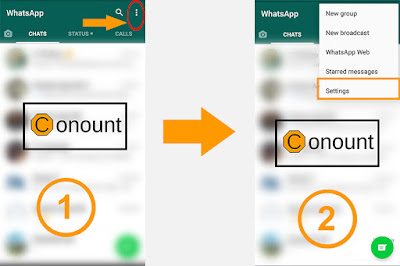
3. Once you go to WhatsApp, tap on the Menu button displayed at the top right corner and then select dropdown icon just after the search bar.

4. Then select, Settings Account Delete my account.

5. A text box will appear on the screen, enter the complete phone number of your device including the international code.

6. Now tap on, “Delete my Account”.


Things you should know when deleting the WhatsApp account !

·   When you have completed the WhatsApp account deletion, contacting you via your WhatsApp account will not be possible. If you were part of your friends' list of favourite persons to contact, your detail and name would not appear any more.

·   All the conversation, messages and chats will be erased from your device and you will be unable to access such information. If WhatsApp is synchronized the data can be recovered.


·  You name as well as the number will not be part of the WhatsApp groups you belonged to earlier. 


How To Track Unknown Phone Numbers 100%


Smartphone market had taken the willing path to reach the top of all requirements. By looking at these facts, one is bound to receive hundreds of spam or telemarketing calls. Let’s admit, the unknown numbers and private calls were the worst types of anxiety that we face on a daily basis.

Many of restricted or unidentified numbers call come from telemarketers trying to sell products. These are usually spam calls, but it can invite lots of financial and mental troubles to us. So, to deal with spam calls, Conount has decided to share a few best tips to recognize and block spam/unknown calls.


True Caller (Desktop Version)


Ths web app uses massive number database to identify callers. Truecaller is a Swedish company which has over 85 million users. It works with a database of millions of previously identified numbers. The program also searches on the internet to gather other information related to the caller.

Step 1 
  First of all, go to the Truecaller official website with your PC.


Step 2
Select your country from the drop-down if you are from Sri Lanka then the default option will be “Sri Lanka (+94) enter the phone number that you want to search and then click on search.


Step 3 

Now it will ask you to sign up with a true caller to know the details of your searched mobile number. If you have a Gmail or Microsoft account then you can connect with Truecaller.


Step 4 
After the sign up completed successfully you will be given the complete details of your searched number. And the information is completely true and 90% accurate.


2. Using True Caller on Android

You can get benefitted from Truecaller if you have an Android smartphone. To make the most use of this fantastic product, you need to install the Truecaller app on your Android smartphone.


Step 1 
    Download True Caller App from play store.


Step 2 
   Click "Get started " button. 


Step 3 
   If you like to set Default true caller app Click "Set" if not click Cancel. 


Step 4 
    Click Continue


Step 5 
   Click Allow button.


Step 6 
   Type your Mobile Number and Click. Continue. 


Step 7 
   Click  "Agree & Continue". 


Step 8 
    then there is a litter bit verification system like Viber 


Step 9 
   Click the  "Google"  Button


Step 10 
    All Done.!


TrueCaller Alternatives For Android

there are some other Android apps available on the Google Play Store that allows users to identify the numbers and blocks the spam calls.


1 ) Whoscall


It is one of the best and leading Truecaller alternatives app that’s available for both Android and iOS. The great thing about Whoscall is that it has been downloaded over 70 million times and it has own offline database to identify calls. Whoscall also blocks spam calls automatically.

1 ) Showcaller

It is another best TrueCaller alternatives on the list which specialized in identifying caller ID and region. Not just that, but Showcaller can also identify spam calls, telemarketing calls. The app is now used by millions of users and it requires less than 10MB to install on your Android smartphone.


Computer Hope


hi, how are you?  Today we are going to review a web site called "computer hope" .this is a very interesting page because it helps to find the meaning of the words and explanation about those words using in IT industry. The big advantage is it's very easy to understand. So many People are Using this web site like students, teachers.....as a learner I like this page very much. because it has clean and easy to understand interface.I recommend this website instead of the Wikipedia website for anyone who likes to discover computer words.


History of this Web SIte

Computer Hope went online 2 November 1998 as a reference for basic computer information and help.

In March 2001 Computer Hope was included in PC World Sixth Annual Best Free Stuff on the Web. Its growth continued to the point that in 2002 they received over two million unique visitors and over eighteen million hits and as of January 3, 2009, is the number one result when searching for the phrase "computer help" on the Google search engine.

In March 2009 Computer Hope was mentioned on the BBC Webscape show.


In August 2009, Computer Hope was included/mentioned in the Today show. Also during August 2009, ComputerHope was mentioned and had an article in Reader's Digest's article about Reader's Digest Fix Computers, Cars and Appliances for Free article

 Click here to visit the Computerhope.com


Antivirus and Antimalware

 Antivirus and Antimalware


Antivirus is also known as Antimalware Software, and the user tends to use both terms interchangeably, by mistakenly thinking that antivirus software can address all types of malware. They cannot detect every type of virus, and cannot protect the individuals against advanced forms of malware, as if antimalware software does.

The user should be safe on the Internet, but in reality, we need the software programs to keep our device secure.

Cybercriminals became organized, more skilled, and persistent in their spam campaign. They use new plans, such as new extensions to use flaws in outdated devices or auto-updating links in malicious emails.

Cyber-attacks have been on the rise over the last years and will continue to increase. In the report, it is said that the number of Ransomware attacks is almost doubled in the first half of 2017 and compare to 2016.

Antimalware and Antivirus are two of the most common types of security software, but it sounds like they do the same job; they are a little bit different. Antivirus software provides general-purpose security for your device, guarding it against a variety of known pre-existing viruses and exploits.

On the other hand, Antimalware is the specialized layer of defence specially designed to fight Trojans and Ransomware. While many professionals and organizations have selected to stick with generic Antivirus. Many have also increased this with additional antimalware tools.

What is Antivirus and how it Works?
Are you not able to use your Mobile device, PC, Laptop, Tablet, and much more technical device? Have you tried various methods and install numerous Antivirus programs to resolve the issue? Here are the resolutions that guide you for what to do and how to get the perfect and best antivirus software to remove all unsophisticated software in no time.

The malware first rose to distinction in the early days of the Internet. As the number of individuals with internet access grew, and malware could spread more quickly, and the most common form of malware was the self-effacing virus.

Several organizations are obtainable from the Antivirus to deal with the viruses created from USB devices and Internet Service. From many tests, the individuals always like to install the best antivirus software on their PC. Still, finally, they lost the way to search and remain away from the right direction and failed to install the appropriate Antivirus software for Windows devices.

Are Antivirus and Antimalware are same?
Confusingly, Antimalware and Antivirus tools are not the same things. Antimalware software, also known as malware removals tools and is slightly different in function to traditional Antivirus.

Antivirus focuses on protecting, preventing a device by stopping it from becoming infected in the first place. Antimalware, however, is geared towards destroying malicious software and rooting out that have already been downloaded as well as activated. While there are many crossovers between the two tools, and many security experts advise using both of antimalware and Antivirus tools together to maximize the protection.

Today, so-called antivirus software will protect against a wide range of different types of malware. Moreover, viruses themselves are increasingly uncommon computer Technology Articles, as more cybercriminals discard them in favour of more methods that are effective.

                                          If you Like this article Don't Forget To share 


Source:from ArticlesFactory

Best Screen Recoding Software


There are so many Screen Recorders. But how we find a better Screen Recorder.BSR Screen Recorder best solution. Let's See Why you need to use the BSR Screen Recorder.Common Answer is it's has a more feature with a good user interface.BSR captures anything you see on the screen as video+audio and pictures. Records video to AVI, SWF, WMV, EXE formats. Any portion of the screen can be selected for recording. Records audio from microphone, speakers (what you hear), CD Audio, MIDI etc. into the video. Includes everything you will need in a screen recorder. Plus includes Movie Lab and Studio: Cut portions from video, add sound, join & split videos, change their speed, compression etc.

Features :

* Wide range of speed configuration.
* Auto configuration of the playback speed.
* Size configuration for zoom-in, zoom-out
* Mouse cursor recording
* Custom mouse cursor selection
* Records mouse click displays and highlights
* Keystroke display recording
* Mouse and keystroke sounds recording
* Display date and time on your video
* Change compression options such as quality, keyframe rate etc.
* Audio quality settings
* Subtitle text settings
* DivX and Xvid compatible
* Hotkeys for 'Record', 'Stop', 'Pause' and 'Take Picture'.
* Multi File Recording Function
* Adviser for Video File Size
* Manual recording
* Handycam function (Auto-Pan)
* Can work completely invisible
* Runs in a tray or at the corner.
* Display of file size during recording
* File size limit feature
* You can set it to start and stop recording at a certain time
* Interleave option for audio
* Additional functions for audio synchronization
* Video and picture capture mode settings
* Has Photo and Movie Studio
* Add/Mix Audio Into Video File
* Cut Portions From Video
* Export Pictures From Video
* Extract Sound From Video to Wav File
* Merge Videos
* Pictures To Video
* Audio Synchronization

* Resample Video


how to use canva


today we are going to teach you how to use Canva. to make your dream designs. Canva is a simplified graphic-design tool, founded in 2012. It uses a drag-and-drop format and provides access to photographs, vector images, graphics, and fonts. It is used by non-designers as well as professionals tools can be used for both web and print media design and graphics.


1) First, go to the Canva Home Page.


2) Then Click  Sign Up with Google Button.


3) Now, Type Your Email and Password to Sign Up.


4) Now We Complete Our registration. This is your Dashboard. There are Many Designs          You can edit. Like Youtube Channel Art  Designs, facebook cover design and much              more.........


5) Check Below Video  to More Information


What is Cloud Computing?


Cloud computing is a client shared computing through the internet hence the term cloud computing. Cloud computing allows companies to have access to resources as they need them without having to maintain the infrastructure for these resources.

This is beneficial to clients who want to utilize the software without the expense of maintaining an IT department. With the evolution of computers and internet clients can use internet supported products that look and act as if the programs are locally installed. Most Cloud Computing providers offer common business applications through the internet and through a web browser while the data and software are stored on a different server.

Even though clouds will appear as single points for their clients they may actually be using multiple servers to maintain the client's data. Clouds must maintain a certain quality of service and an agreement between cloud and client called a Service Level Agreement is traditionally signed. There are several different clouds that are available some of the major cloud providers are Microsoft, IBM, Salesforce, Hewlett Packard, IBM, Amazon, and Google.

Traditionally cloud providers will bill for usage similar to that used by utility companies. This is a great benefit to cloud providers with multiple companies there is no downtime servers are constantly utilized. When deciding whether a cloud provider is the right choice or maintaining your own there are a few things to consider. Cloud provider may save on upfront capital expenditures but operating costs can be expensive. Cloud providers charge for IP addresses, and data transfer in and out of storage business Management Articles, Put request and get requests and load balancing.

                                          If you Like this article Don't Forget To Share 


Source: from ArticlesFactory

How to Download All Emails to Computer?


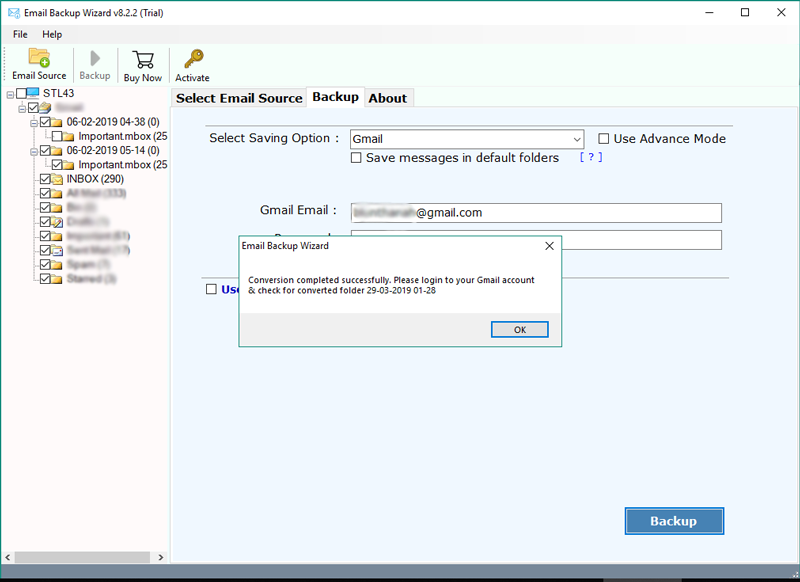
Email download software is a professional solution to download emails to the computer. This amazing utility allows the user to download bulk emails from the webmail server to different file formats. Using this application, you can easily download all emails with attachments.

Are you also searching for some solution on how to download bulk emails to computer? Then. don’t need to worry as we have come up with the best solution to backup emails on the computer. There are thousands of users around the globe who utilize multiple email accounts for personal and professional business reasons. It is so much frequent query searched by users on the internet to download current emails on the hard drive. Every email account has a certain amount of space to store email messages. However, you may often run out of space, if you exceed the maximum amount of space that you are allotted. In that case, backup of data is very essential to prevent data loss or unexpected errors. Read this complete article to find an appropriate solution for taking a backup of all data stored in email systems.

If you want to take a backup of all your important emails from different email accounts on a PC, then it is suggested to try Email download software to download all emails to computer directly. It is a popular tool to download current emails, download new emails, download received emails, download sent emails from the server, download multiple emails to the computer. It allows users to create a backup of about 60+ email client services. The tool offers to download all emails from the webmail server to 25+ saving options. This utility gives option to download selected emails from Amazon Work email, Gmail, Blue Host, Outlook.com, GoDaddy, G Suite, Hotmail, Office 365 and many more.

Here is the Solution downloadmails.com


 program screenshot
Source: from https://www.downloadmails.com/img/download-emails/email-backup.png


Step-1. 
Run Email Download Software on Windows Computer.
Step-2.
Select the Email account from the list of Email Source.
Step-3.
After that, enter the email account credentials & click on the Login button.
Step-4.
Now, choose the required email folders like Inbox, Sent, Draft, Trash, etc.
Step-5.
Thereafter, pick the desired file saving option such as PST, PDF, HTML, DOC, etc.
Step-6.
Use filters for downloading emails from the server with selective backup mode.
Step-7.
Now, set the resultant location where you want to download emails from the cloud.
Step-8.
Finalize your email downloading process by clicking the backup button.


Any Question  Click the image


                            If you Like this article Don't Forget To Share 

Source:from ArticlesFactory

Best Software Web Site


Get Into Pc


Famous website among the Computer Use People .this web site provides the free offline installers for the software, premium apps, freeware, shareware & trial ware software with proper credit to publishers. all the links are safe, secure and up-to-date. they provide only latest and full version software. download links are 100% working and recently updated in 2018.

there are lot of Software you can find thorough this web site.Get Into PC has Lot Of Categorization so It Helps  to Find what Page viewer Need .it's a very Helpful . But crack Software is Some Kind Threat For Your Computer .Because there are back Doors Behind the Software .some time With out User Permission  your Data has Stolen By another man Or Another Group.


                                        If you Like this article Don't Forget To share 

Find Us on Instagram

Featured

[Featured][recentbylabel2]

Featured

[Featured][recentbylabel2]
Message From Conount
If you fell down yesterday, stand up today.
Ok